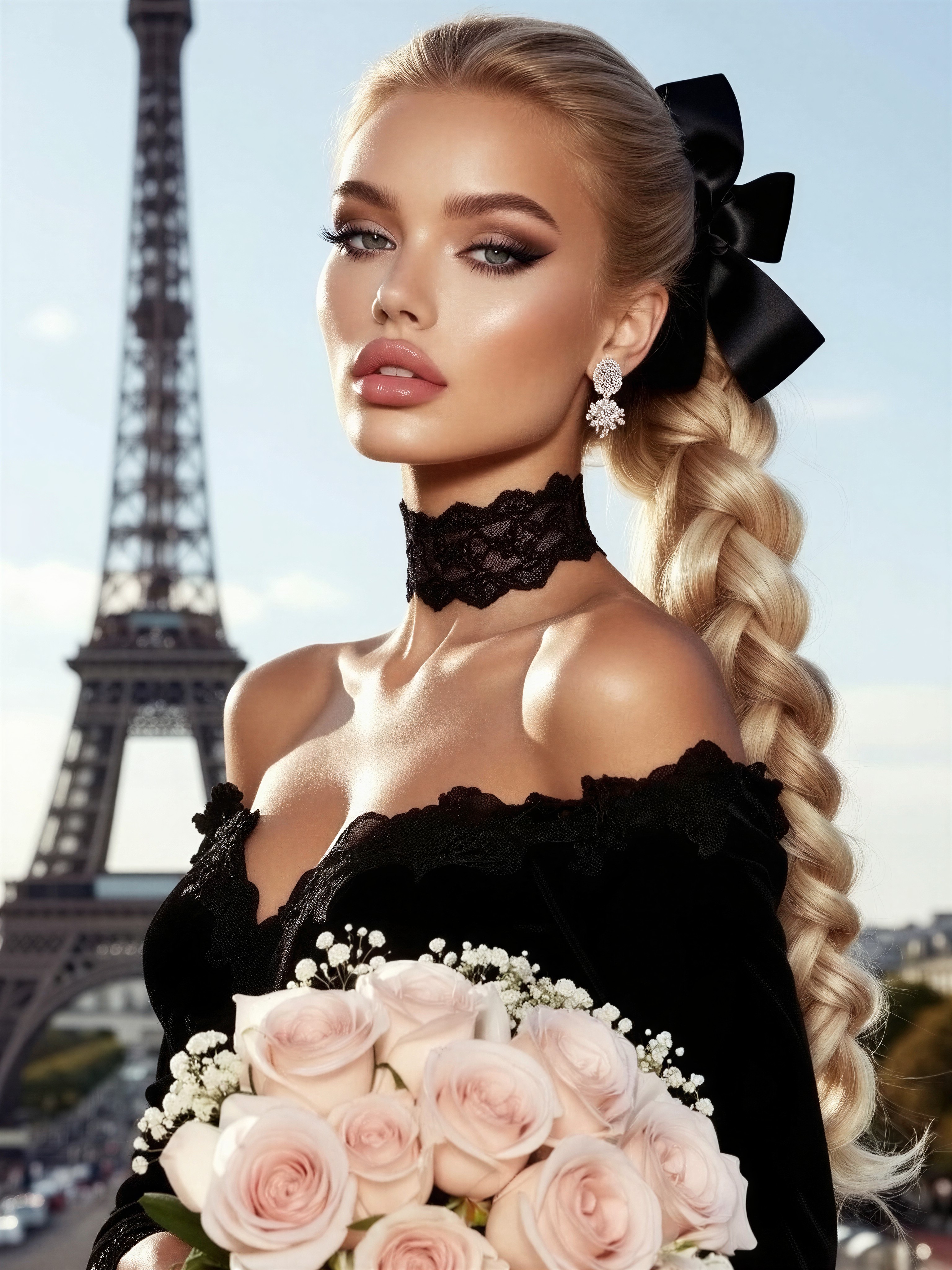


Parisian Romance with an Edge: Black Lace, Pink Roses, and the Eiffel Tower
A large black bow woven into intricately braided blonde hair is the detail that makes this editorial sing — it's the kind of accessory that reads couture rather than costume. Z-Image Base handles the challenge well: glossy pink lips, smoky eyeshadow, and defined eyebrows each resolve as distinct makeup layers instead of blending into one soft blur.
The composition stacks contrast deliberately — black lace choker and off-the-shoulder dress against soft pink roses and baby's breath, with the Eiffel Tower anchoring the background as a romantic landmark rather than a tourist cliché. Soft natural light keeps the skin luminous, and the hyper-realistic texture emphasis means lace, hair strands, and rose petals all hold up at full resolution.
Fashion Editorials, Bridal Moodboards, and Campaign Mockups
This is classic fashion photography territory: magazine-style editorial layouts, boutique brand campaigns, Pinterest bridal moodboards, and salon portfolio imagery for braiding and makeup artists. The Paris setting and romantic styling also suit perfume or jewellery advertising concepts — those drop earrings and the choker are practically product placement.
Stick to portrait orientation — 1080×1440 (3:4) or taller. The vertical framing flatters the braided updo and lets the Eiffel Tower rise behind the subject instead of being cropped into a stubby silhouette. Wide landscape formats will dilute the editorial intimacy.
Z-Image Base Settings for Crisp Editorial Detail
Z-Image Base is built for maximum creative control across photorealistic and cinematic styles, which makes it a natural fit for editorial work where makeup precision and fabric texture matter. Keep the guidance moderate — over-cranking it pushes skin tones waxy.
- CFG / Guidance:
3.0–3.5— enough discipline for crisp lace and braid detail without hard, plasticky skin - Steps: 12 for quick composition previews, 30 for final quality where individual hair strands and rose petals matter
- Resolution:
1080×1440(3:4) for standard editorial;1344×1792if you plan to crop for print - Negative prompt: add "harsh flash, oversaturated, plastic skin" to protect the soft natural light look
Z-Image Base rewards specificity — the prompt already names individual makeup features, which is why the model separates smoky eyeshadow from glossy lips so cleanly. Keep that structure when you edit.
Layering the LoRAs
- Dark Glamour 80s at
0.65— the dominant style here, lending pastel-warm skin, glossy makeup, and a dreamy glow that suits the Paris romance; this weight makes the glamour unmistakable - Luxury Sparkle at
0.55— adds radiant, light-reflecting polish to the earrings, choker, and bow without turning the whole frame into glitter; drop to0.35if sparkle starts contaminating the roses
The pairing works because Dark Glamour 80s owns the mood while Luxury Sparkle owns the accessories. If you want a cleaner, purely photographic result, pull both down to 0.25–0.30 and let Z-Image Base's realism carry the image.
Five Ways to Restyle the Parisian Editorial
5 Targeted Variations for This Paris Fashion Portrait
- Golden hour drama: Change "soft natural light" to "warm golden hour backlight, lens flare" — the black lace gains a rim of amber light and the Eiffel Tower silhouette turns into a sunset icon
- Rainy noir twist: Replace the romantic backdrop with "rain-slicked Paris street at night, bokeh streetlights, reflective pavement" — same subject, entirely different mood: cinematic noir instead of timeless romance
- Swap the landmark: Change "the Eiffel Tower, Paris" to "Venetian canal at dusk, weathered palazzo facade" — the editorial shifts from French chic to Italian melancholy, and warm terracotta tones follow automatically
- Wardrobe inversion: Swap the "black off-the-shoulder dress" for "ivory silk gown, pearl details" — the contrast flips from dark-on-light to light-on-light, ideal for bridal campaign work
- Close-up beauty crop: Add "extreme close-up, face and braided hair only, shallow depth of field" — sacrifices the Paris backdrop but turns the makeup and braid detail into a beauty-ad hero shot
Two Prompts Ready to Generate
Both examples apply the variations above directly, tuned for Z-Image Base with the LoRA weights recommended earlier.
Variation: golden hour drama — warm backlight replaces soft daylight, giving the black lace an amber rim and the tower a sunset silhouette
Fashion photography, editorial style. Beautifully styled woman with long intricately braided blonde hair and a large black bow, defined eyebrows, smoky eyeshadow, glossy pink lips, black lace choker, drop earrings, black off-the-shoulder dress with lace accents, holding pink roses and baby's breath. Eiffel Tower behind her in warm golden hour backlight, soft lens flare, cinematic framing, hyper-realistic textures, 8K
Variation: rainy noir twist — the romantic Paris backdrop becomes a moody night scene with reflective streets and bokeh lights
Fashion photography, editorial style. Styled woman with intricately braided blonde hair, large black bow, smoky eyeshadow, glossy lips, black lace choker and off-the-shoulder dress with lace accents, holding a bouquet of pink roses. Rain-slicked Paris street at night, Eiffel Tower glowing in the distance, bokeh streetlights reflecting on wet pavement, moody cinematic lighting, hyper-realistic skin and fabric texture, 8K
More Fashion Editorials in This Direction
These prompts explore the same styled-portrait territory from different angles — neon city glamour, influencer aesthetics, and movement-driven editorial work: