

A Storm Made of Feathers: The Morrigan in Full-Body Concept Art
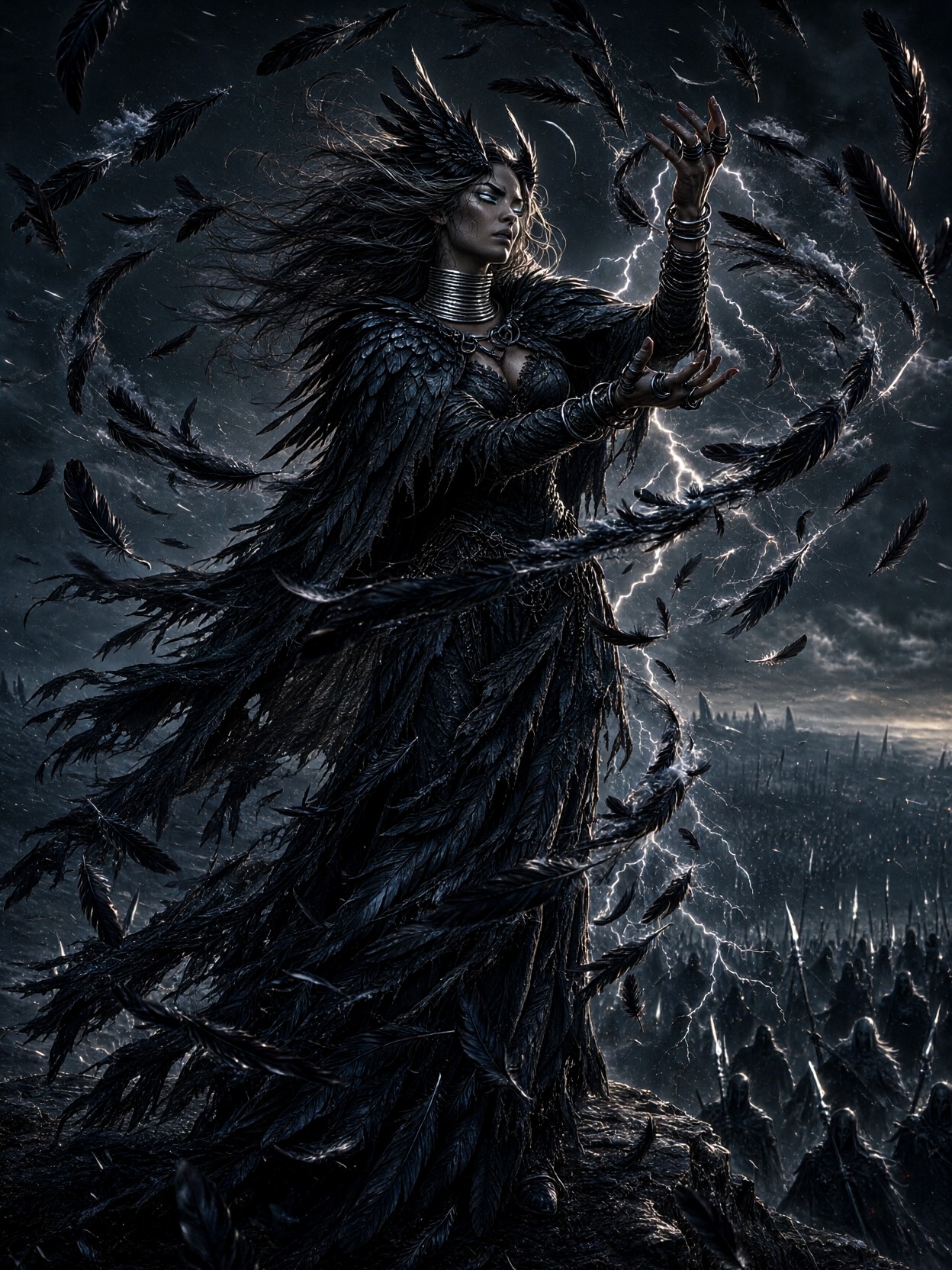
The most striking move here is the feather-to-storm transformation — raven feathers spiraling around raised hands, then igniting into stormclouds and lightning threads. That single transition gives the model a narrative arc to render, not just a static pose. Qwen 2.1 handles it well because the effect lives in two of its strengths: lifelike portrait lighting for the pale stormlight eyes, and fine detail for the layered feather cloak.
The composition stacks three depth layers — goddess in the foreground, ghostly battlefield silhouettes with spear glints below, storm horizon behind — so atmospheric perspective does the storytelling. The muted slate, charcoal, and bone-white palette keeps the lightning rim light as the only saturated moment, which is exactly what makes the image read as dark fantasy rather than generic epic.
Character Sheets, Card Art, and Cover-Worthy Drama
Full-body character art at this finish is concept-art gold: tabletop RPG character reveals, dark fantasy card games, novel covers featuring antagonist deities, and MMO class announcements all fit. The dynamic three-quarter angle and vertical subject make a 3:4 portrait frame (1080×1440) the natural choice — it protects the clifftop-to-battlefield vertical stack.
One limitation to respect: the ghostly silhouettes below are small figures by design. If you need individual enemy detail, this prompt won't give it — it's built for scale and mood, not crowd readability.
Qwen 2.1 Settings for Feather Detail and Lightning Contrast
Qwen 2.1's native 2K output means you can push resolution without upscaling artifacts — valuable when dozens of individual feathers need to stay crisp.
- CFG / guidance:
3.5— enough to hold the feather-storm geometry without clipping the lightning highlights - Steps: 30 for final quality (fine feather layering rewards it); 12 for composition previews
- Resolution:
1080×1440(3:4) or1536×2048to exploit native 2K for print
Keep the palette words — "muted slate, charcoal, bone-white" — in the prompt even when adding LoRAs. They anchor Qwen 2.1's color grading against style drift toward saturated fantasy purples.
Layering the LoRAs
- Fantasy Renaissance at
0.60— dominant enough to give the cloak and torque a painterly, classical weight; above0.70it starts softening the lightning edges - GPT style at
0.40— adds gilded iridescence and cinematic glow to the storm effect without taking over; raise to0.55if you want the feathers to shimmer more opulently
The hierarchy matters: Renaissance leads the figure, GPT style leads the magic. If the battlefield silhouettes turn too luminous, drop GPT style to 0.30.
Five Ways to Reshape the Morrigan
5 Targeted Variations for This War Goddess Prompt
- Swap the magic: Replace "storm of black feathers" with "spiral of burning embers and ash" — same composition, but the palette shifts toward deep reds and the mood becomes volcanic rather than tempest
- Change her allegiance: Change "ghostly silhouettes with spear glints" to "army of radiant warriors with banner light" — she becomes a protector rather than a harbinger, and the rim light warms
- Move the camera low: Add "low angle looking up, towering silhouette against the storm" — sacrifices the battlefield view but turns her into something mythic and overwhelming, ideal for cover art
- Crow-to-serpent twist: Replace the feather cloak with "cloak of layered serpent scales, silver torque gleaming" — a different war-goddess lineage, colder texture, same silhouette logic
- Dawn aftermath: Change the storm to "fading storm at dawn, last lightning thread dissolving, pale gold breaking through slate clouds" — the palette gains warmth and the mood shifts from threat to aftermath
Two Prompts Ready to Generate
Both examples below apply variations from the list, tuned for Qwen 2.1 at the settings above with the LoRA weights recommended.
Variation: low-angle cover art — the camera drops, the battlefield falls away, and the Morrigan towers against her own storm
Dark fantasy concept art, full-body low angle looking up at the Morrigan, tall regal war goddess in a tattered cloak of layered raven feathers, silver torque and dark iron rings, towering against a spiraling storm of black feathers and lightning threads, eyes glowing pale stormlight, hair whipping in gale wind, dramatic rim light, muted slate and charcoal palette, mythic scale, highly detailed, 8k
Variation: ember magic — the feather storm becomes burning embers and ash, shifting the palette from cold storm to volcanic fire
Dark fantasy concept art, full-body the Morrigan on a windswept clifftop, tattered cloak of layered raven feathers, silver torque and dark iron rings, weaving a spiraling storm of burning embers and drifting ash around her raised hands, embers igniting into firestorm clouds, shadowed battlefield of ghostly silhouettes below, ember rim light, deep red and charcoal palette, moody atmospheric depth, highly detailed, 8k
More Dark Fantasy and Character Prompts
These prompts explore adjacent territory — mythic figures, battlefields, and divine presence rendered at concept-art finish: