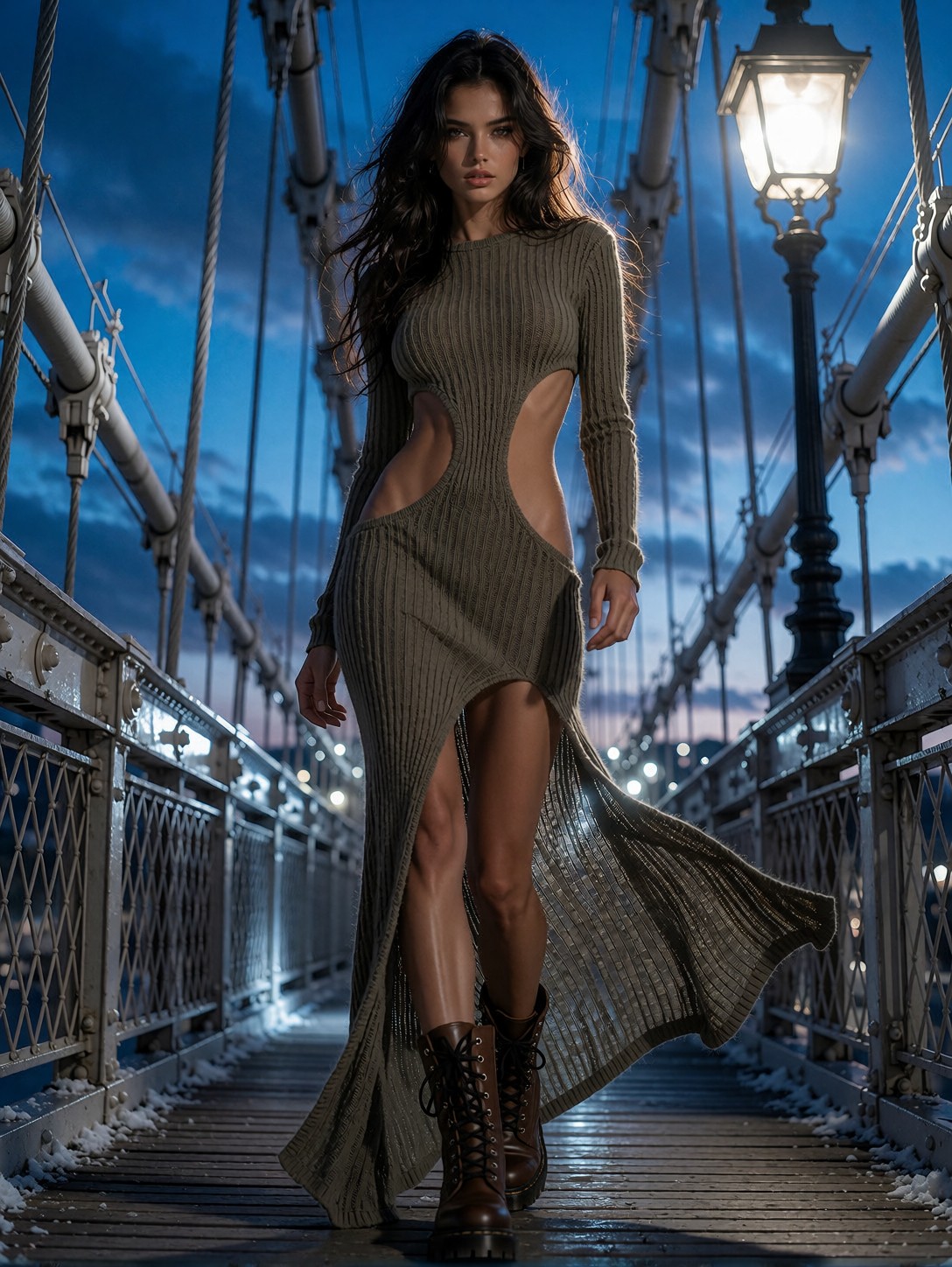


Twilight Bridge Editorial: The Fusion of Industrial and High Fashion
At twilight, a suspension bridge becomes the runway for a high-fashion editorial that fuses industrial grit with sleek seduction. The subject, a young woman in a ribbed olive-green body-con dress, stands centered, her silhouette framed by steel cables glowing under cold blue dusk. A single warm street lamp carves a rim light along her hair and shoulders, creating a color contrast that the model renders with photographic precision. The 50mm f/1.2 lens isolates the knit texture of the dress and the metallic sheen of the bridge, while high-contrast lighting emphasizes every contour. The result is a photorealistic, 8K image that feels both cinematic and intimate, capturing a moment of quiet confidence against a massive structure.
Ideal for Fashion Brands and Editorial Campaigns
When a brand needs a cover that screams urban luxury, this bridge editorial delivers. The full-body framing showcases entire outfits, making it suitable for lookbooks, magazine spreads, and social media ads that require a bold visual hook. The industrial backdrop adds an edge for streetwear lines, while the high resolution supports large‑format posters and website hero banners. For print, a 3:4 aspect ratio preserves the vertical drama, but a 2:3 crop can emphasize the subject if space is limited.
Optimal Settings for Krea 2
For Krea 2, start with a CFG scale of 3.5 to balance creativity and fidelity. Use 30 steps for fine detail, or 12 for quick previews. A resolution of 1080×1440 (3:4) captures the full-body composition without sacrificing texture. If you prefer a square format, 1024×1024 works but may crop the legs. The model's intelligent style blending means it will naturally harmonize the cool and warm light sources, so avoid over‑tuning the white balance.
Layering the LoRAs
Apply the GPT style LoRA at weight 0.65 to introduce a luminous, dreamlike glow, and the Realistic Smartphone Snapshot LoRA at weight 0.85 to ground the image in a candid, natural look. Because the smartphone LoRA is stronger, it will dominate; reduce it to 0.6 if you want the fantasy glow to be more visible. You can also run them sequentially: first generate with GPT style, then refine with the smartphone LoRA for a layered effect.
Five Variations to Transform the Bridge Editorial
Five Variations to Transform the Bridge Editorial
- Swap the dress: Replace the olive knit with a metallic silver gown to push the scene into futuristic territory, reflecting the bridge lights.
- Shift the time of day: Change twilight to golden hour, bathing the steel cables in warm amber and creating a softer contrast.
- Add weather: Introduce light rain and reflections on the bridge surface for a moody, cinematic atmosphere.
- Change the lens: Use a 35mm lens instead of 50mm to capture more of the surrounding cityscape, making the subject feel smaller within the environment.
- Alter the pose: Have the model turn slightly, looking away from the camera, to convey introspection rather than direct gaze.
Two Prompts Ready to Generate
Here are two ready‑to‑generate prompts that apply the variations above, each tuned for Krea 2 at the settings recommended earlier.
Variation: metallic silver gown, futuristic vibe — same bridge setting but with a sleek, reflective dress that catches the city lights
Dynamic full-body shot of a young woman in a metallic silver gown standing on a suspension bridge at twilight, cold blue ambient light, warm street lamp rim light, high-contrast, razor-sharp focus on fabric and steel, photorealistic, 8k
Variation: golden hour, warm tones — same subject but bathed in amber light, softening the industrial backdrop
Full-body fashion portrait of a woman in ribbed olive dress on a suspension bridge during golden hour, warm amber light, soft shadows, cinematic, high-contrast, 50mm f/1.2, photorealistic, 8k
More Fashion Editorials in This Style
Other prompts in this category push the same fashion‑editorial territory from different angles — varied locations, moods, and cultural influences: