Frosted Glass and Glowing Rings: Anatomy of a Holographic Command Panel
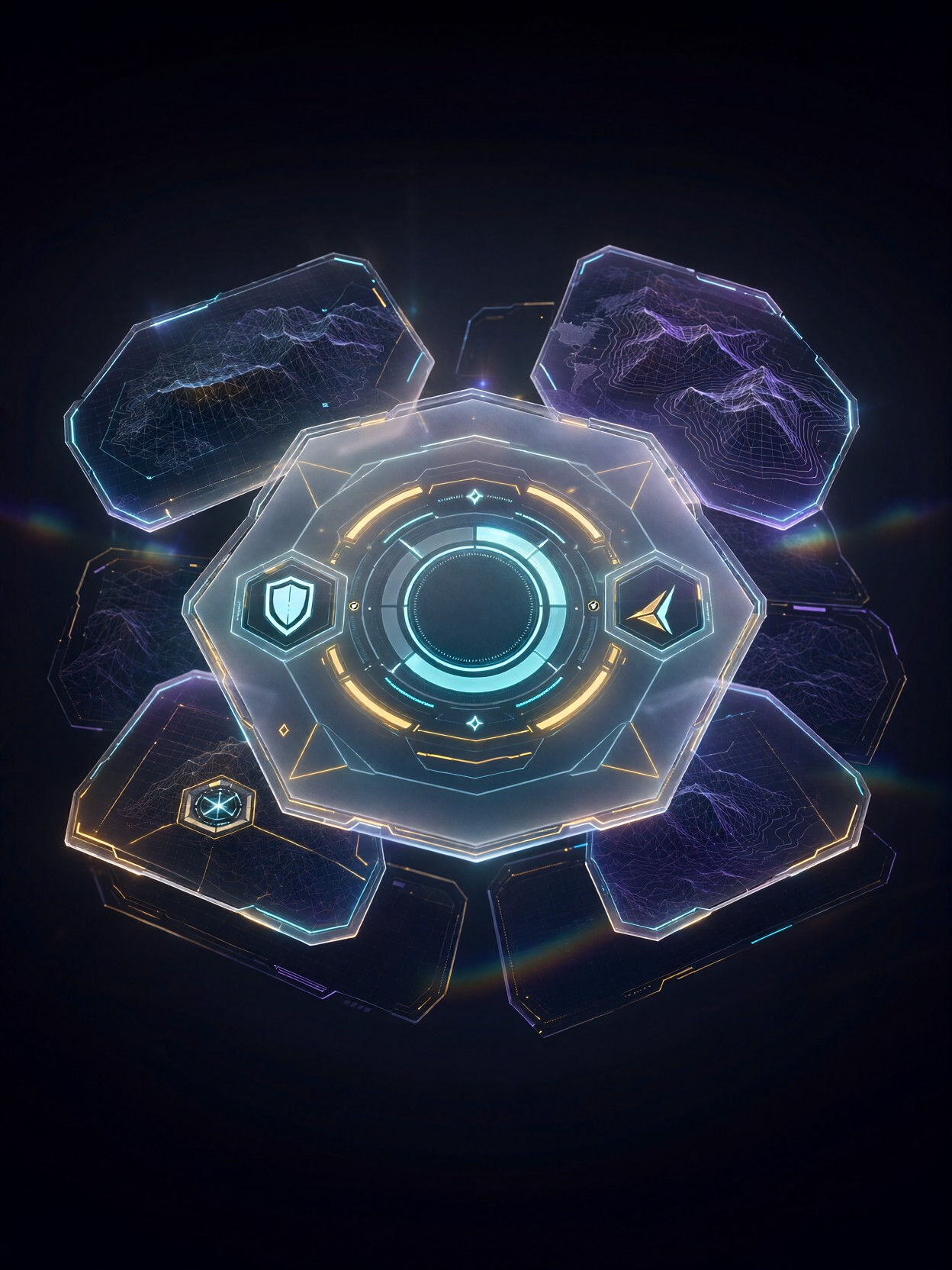
Semi-transparent frosted glass with glowing geometric outlines is what separates a convincing holographic UI from a flat, cartoonish HUD — and this prompt leans into that contrast hard. The octagonal command panel gives Qwen 2.1 a strong central silhouette to build around, while the cyan-and-amber color pairing creates instant visual hierarchy: cool data, warm alerts.
The rotating progress rings and hexagonal status icons act as depth anchors, and the wireframe topography charts behind the glass panels in navy and violet gradients prevent the dark background from feeling empty. Volumetric light bleeding from the interface elements plus subtle lens flares gives everything a soft sci-fi bloom. It reads like a screenshot from a AAA strategy game's main menu — sharp vector lines, clean technical type, all rendered at native 2K.
Game Dev Mockups, Streaming Overlays, and Key Art
This kind of output is gold for indie game developers pitching a futuristic strategy or space-sim title — a polished UI mockup sells the fantasy before a single line of code exists. It also works beautifully for streaming overlays, sci-fi book covers with HUD motifs, and mood-board material for UI/UX designers.
Keep it at 16:9 or square — wide framing suits actual in-game HUD layout, while 1:1 works well for portfolio presentation. Avoid tall portrait crops; the octagonal panel wants horizontal breathing room, and vertical crops will slice the rings awkwardly.
Settings for Qwen 2.1 — Native 2K and Sharp Type
Qwen 2.1's headline strengths are native 2K output, crisp integrated typography, and fine detail — all three matter enormously for UI generation, where blurry icons and garbled text ruin the illusion instantly.
- Guidance (true_cfg_scale):
3.5default works well; push to4.0if the ring geometry drifts or icons blur together - Steps: 30 for final quality — the fine wireframe topography needs the extra refinement; use 12 only for composition previews
- Resolution:
1664×928for cinematic 16:9, or1440×1440for a square menu-screen mockup
Because Qwen 2.1 renders text natively, name the labels explicitly — "SHIELDS", "NAV", "ENERGY" — and it will letter them cleanly instead of producing pseudo-glyphs.
Five Ways to Push the Holographic Interface Further
5 Targeted Variations for This Tactical UI Prompt
- Change the palette: Swap "cyan and amber" for "crimson and gold" — the interface instantly reads as hostile faction or emergency battle-stations mode instead of calm command
- Shift the genre: Replace "octagonal command panel" with "steampunk brass instrument panel, analog dials, etched glass" — same layout language, Victorian sci-fi execution
- Add a context scene: Append "reflected faintly on a spaceship cockpit windshield, pilot silhouette in foreground" — the UI becomes environmental rather than standalone
- Emergency state: Change "rotating circular progress rings" to "flickering damage warning rings, glitch artifacts, red alert strobe" — great for boss-fight or critical-status variants
- Named labels for real text: Add "labels reading SHIELDS, NAVIGATION, POWER CORE in clean sans-serif type" — Qwen 2.1's typography strength turns the mockup into a usable design reference
Two Prompts Ready to Generate
Both examples below apply the variations above directly, tuned for Qwen 2.1 at 2K with sharp typography.
Variation: emergency state — the calm tactical panel becomes a red-alert combat HUD with glitch flicker
Game UI, holographic tactical interface in emergency mode. Translucent octagonal command panel of frosted glass with glowing crimson and gold outlines, flickering damage warning rings around a central power meter, hexagonal status icons, glitch artifacts and red alert strobe. Wireframe topography charts in deep red and violet gradients behind the glass. Volumetric light, lens flares, dark background. Labels reading SHIELDS, NAVIGATION, POWER CORE in clean sans-serif. Sharp vector lines, 8k, 16:9
Variation: steampunk genre shift — same command-panel layout reinterpreted with brass, analog dials, and etched glass
Game UI, steampunk instrument interface. An octagonal panel of etched frosted glass with glowing brass filigree outlines, warm amber and teal accents. Analog dials and circular gauges around a central pressure meter, hexagonal brass plaques for status. Faint blueprint charts behind the glass in deep navy. Soft gaslight volumetric glow, subtle lens flare, dark Victorian workshop background. Labels reading STEAM, NAVIGATION, BOILER. Sharp engraved linework, 8k, 16:9
More Game Interface Prompts to Explore
These related prompts cover the UI spectrum from fantasy shop menus to dark boss-battle HUDs — useful comparisons if you're building a full interface kit: