

Pastel Dawn and a Sheer Linen Dress: Anatomy of a Misty Beach Portrait
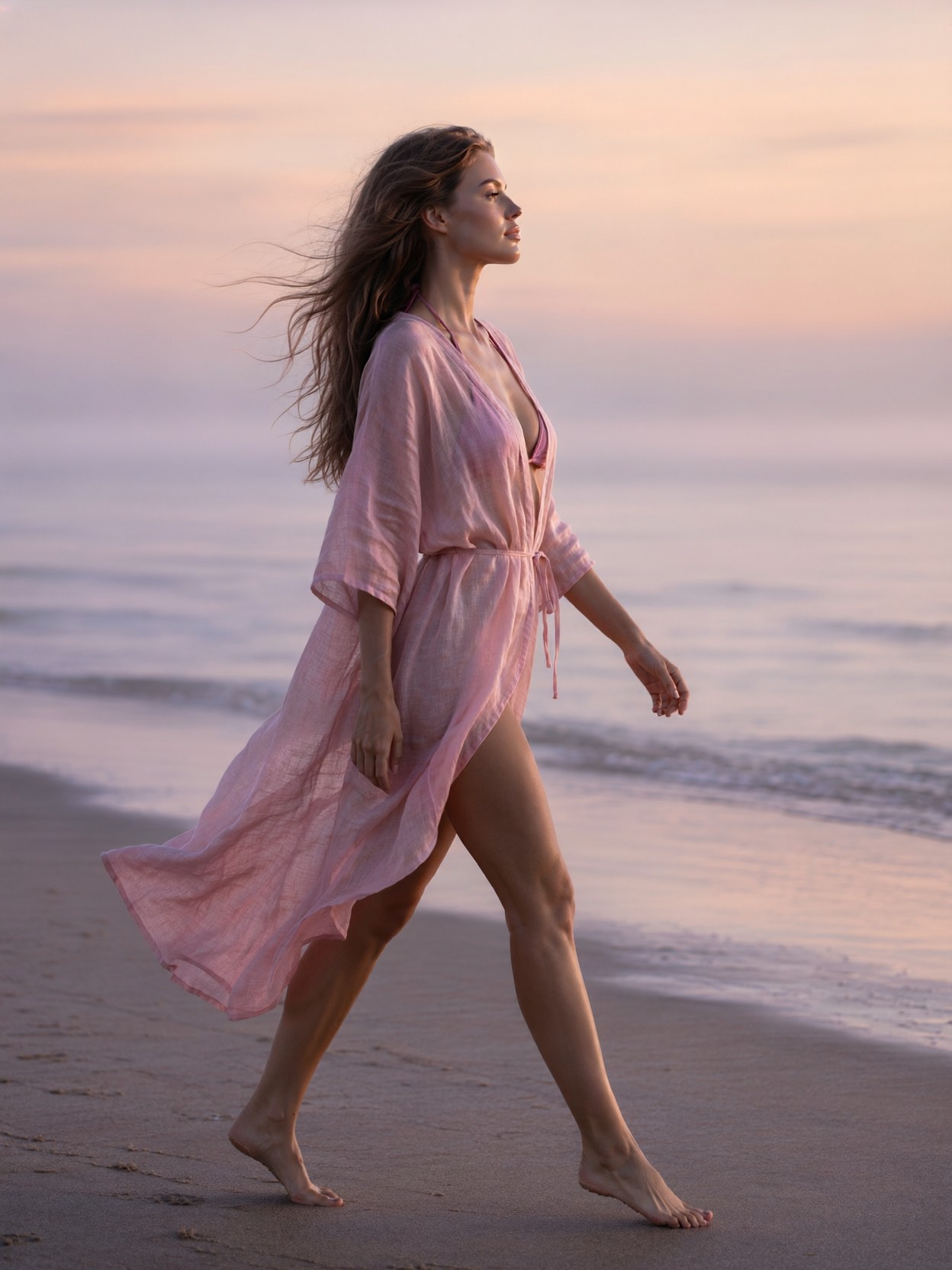
The most delicate element here is the fabric — a semi-sheer powder-pink linen cover-up caught mid-flutter, which forces the model to render translucency, motion, and morning backlight all at once. Qwen 2.1 handles this beautifully: native 2K output keeps the weave of the linen readable while the 85mm f/1.4 look melts the misty shoreline into a soft peach-and-lavender gradient behind her.
The side-profile composition does quiet work too. A profile at chest-up distance gives the model a clean silhouette against the haze, so the "peaceful expression" reads through jawline and gaze rather than eye contact. The pastel dawn light acts like a giant softbox — silky, low-contrast, and forgiving on skin texture.
Morning Light for Wellness, Editorial, and Mood Boards
This is natural territory for wellness brand imagery, meditation app visuals, editorial fashion moodboards, and fine-art print series — anything that trades on calm and atmosphere. The 3:4 portrait orientation suits the chest-up framing best; a landscape crop would dilute the intimacy and scatter the composition into empty beach.
One honest limitation: the mood is inherently soft and low-energy. If you need punchy commercial energy or bold colour, this prompt's pastel palette will fight you — lean into it rather than against it.
Qwen 2.1 Settings for Silky Skin and Translucent Linen
Qwen 2.1's lifelike portrait lighting and native 2K resolution mean you don't need to over-prompt the camera details — the model understands "shot on Canon EOS R5, 85mm f/1.4" as a depth-of-field instruction, not just decoration.
- CFG / Guidance:
3.0–3.5— higher values push the pastel sky toward oversaturated orange; keep it low for that silky dawn light - Steps: 30 for final quality — the sheer linen translucency and mist gradations reward extra steps; 12 is fine for composition previews
- Resolution:
1080×1440(3:4) or native2048×2560for print-ready detail
If the linen comes out opaque, add "backlit by low sun, fabric glowing translucent at the edges" — Qwen 2.1 responds strongly to light-behaviour phrasing.
Layering the LoRAs
- GPT style at
0.60— brings cinematic glow and iridescent colour to the dawn sky; above0.70it will push the scene toward fantasy and away from realism, so hold the line here - Grim Dark Glamour 80s at
0.60— adds shimmering silver highlights and a high-fashion edge to the pastel palette; drop to0.40if the sparkle effects start breaking the misty realism
Together they create a dreamy, editorial-glamour version of realism — luminous but grounded. For purer photographic output, run both below 0.35.
Five Ways to Rewrite the Dawn Walk
5 Targeted Variations for This Misty Beach Portrait
- Flip the hour: Change "early morning light" to "golden hour sunset, warm amber light" — the pastel peach sky deepens to gold and the mood shifts from fresh to nostalgic
- Swap the wardrobe: Replace the linen cover-up with "flowing white silk slip dress" — silk catches light in hard specular streaks, giving a more editorial, high-fashion result
- Change the weather: Change "quiet, misty" to "windy, waves breaking, hair whipping across her face" — motion increases, serenity becomes wildness, and the flutter becomes drama
- Go cinematic-wide: Add "full body wide shot, tiny figure against vast empty beach, 16:9" — trades intimacy for loneliness and scale, ideal for a film still look
- Seasonal twist: Replace "sandy beach" with "snow-dusted shoreline, frozen lake, pale winter sun" — same pose and profile, but the pastel palette cools to silver-blue
Two Prompts Ready to Generate
Both examples below apply variations from the list above, tuned for Qwen 2.1 at the recommended settings.
Variation: golden hour nostalgia — the misty dawn becomes warm sunset, shifting the palette from pastel cool to amber warmth
Realism, atmospheric fine art photography. Side-profile chest-up shot of a serene young woman walking barefoot along a quiet sandy beach at golden hour sunset. She gazes out at the calm ocean, peaceful expression. Semi-sheer powder-pink linen cover-up dress fluttering lightly, long natural wavy hair loose in the warm breeze. Sky in deep amber and rose gold, backlight glowing translucent through the linen fabric. Shot on Canon EOS R5, 85mm f/1.4, shallow depth of field, realistic skin texture, photorealistic, 8k.
Variation: winter shoreline twist — sand becomes frozen lake shore, the pastel palette cools to silver-blue while keeping the same serene profile
Realism, atmospheric fine art photography. Side-profile chest-up shot of a serene young woman walking barefoot along a snow-dusted frozen lakeshore in pale early morning light. Calm frozen horizon, peaceful expression. She wears a semi-sheer ivory linen cover-up over a wool shawl, fabric stirring in the cold air. Long wavy hair loose, breath visible in the frosty air. Sky in soft pastel silver-blue and pale lavender, gentle silky illumination on her face. Shot on Canon EOS R5, 85mm f/1.4, shallow depth of field, realistic skin, photorealistic, 8k.
More Atmospheric Photography Prompts Like This
These prompts explore the same soft-light, atmospheric territory from different subjects and moods — still life, industrial drama, night skies, and water: