Golden Hour on Four Wheels: A TikTok Frame Built in a Single Prompt
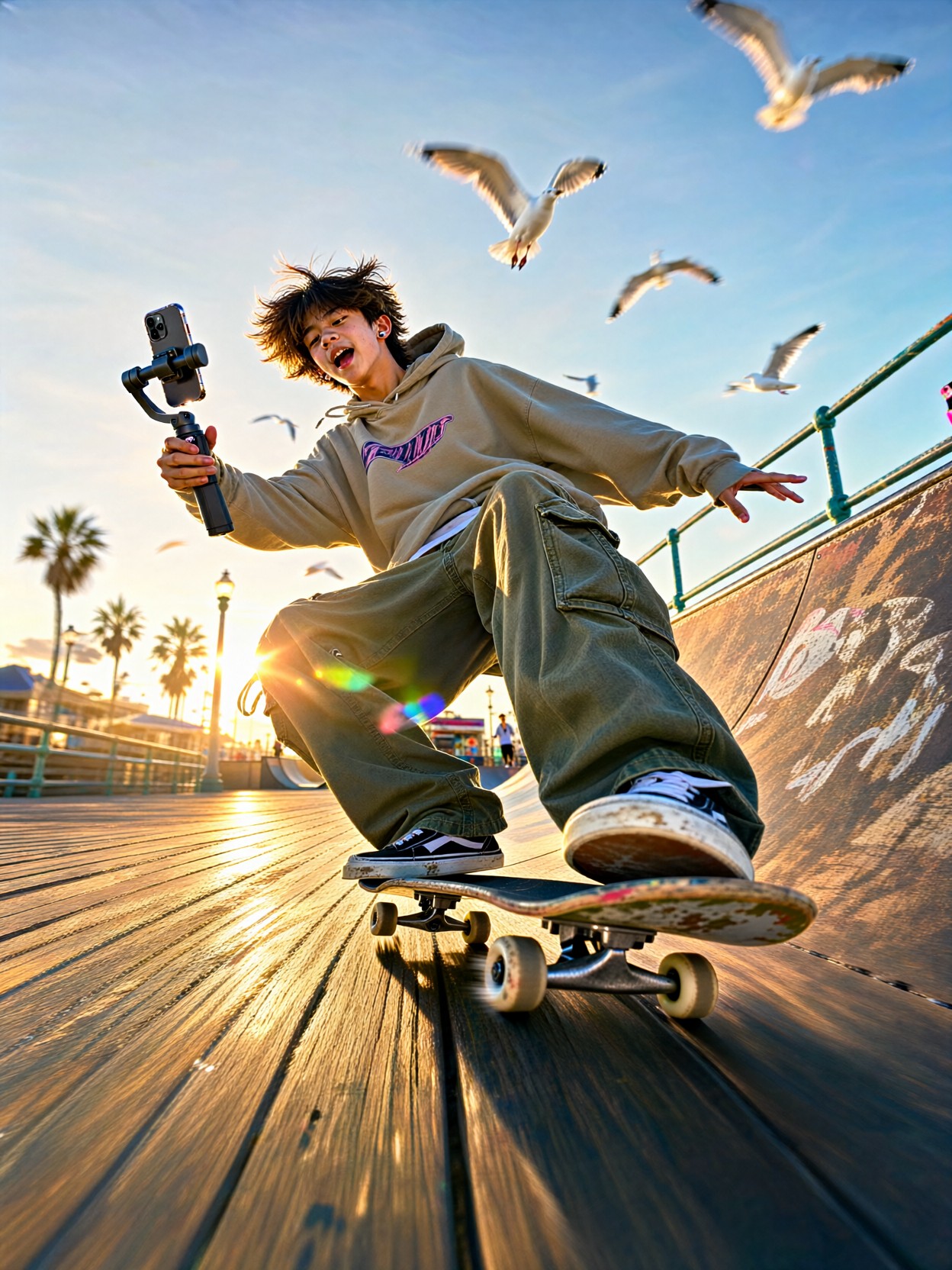
A teenage boy rolling backward down a boardwalk ramp, one hand locked on a gimbal-mounted phone, the other arm floating out for balance — that phone-in-hand detail is what sells this image as authentic creator content rather than generic skate photography. Qwen 2.1 handles the tricky combination beautifully: motion blur on the spinning wheels, a crisp subject, and low golden-hour sunlight raking across weathered planks.
The supporting details do real work too. Seagulls blurred mid-flight add depth behind the subject, palm shadows stripe the warm wood with rhythm, and a subtle phone UI overlay hint pushes the whole frame toward that unmistakable short-form-video aesthetic. Saturated colors and punchy contrast keep it feeling like a screenshot, not a stock photo.
Thumbnail Screens, Social Mockups, and Youth-Brand Visuals
Anything that needs to look like real creator content benefits here: TikTok thumbnail mockups, social media marketing for skate or streetwear brands, app UI demos showing video players with plausible content inside, or YouTube Shorts concept art.
Stay vertical — 9:16 is non-negotiable for this look. A landscape render instantly breaks the "phone video still" illusion. If you need a desktop banner, regenerate with a rephrased prompt rather than cropping.
Dialing In Qwen 2.1 for Motion and Authenticity
Qwen 2.1's native 2K output and lifelike portrait lighting are ideal for this shot — skin tones in golden hour light stay natural instead of going orange and plasticky. A few parameter notes:
- Guidance:
cfg_scale 3.5— keeps the motion blur and flare loose and natural; higher values tend to over-sharpen the wheels and kill the speed feel - Steps: 30 for final quality; 12 for fast composition previews
- Resolution:
1080×1920(9:16) — native vertical; scale to1440×2560for crisp 2K export - Text rendering: if you want an actual username or caption bar in the UI overlay, name it explicitly in the prompt — Qwen 2.1's typography strength means short text like
@usernamecomes out legible
One caution: keep "wide-angle smartphone lens look" in the prompt. Without it, Qwen 2.1 sometimes drifts toward telephoto compression, which flattens the boardwalk perspective and weakens the sense of speed.
Five Ways to Ride This Prompt Somewhere New
Five Targeted Variations on the Boardwalk Skate Shot
- Flip the time of day: swap "golden hour sunlight" for "blue hour, neon boardwalk lights reflecting on wet planks" — the mood shifts from warm and playful to moody and cinematic, and the saturated colors go electric
- Change the trick: replace "rolling backward down a ramp" with "mid-air ollie over a gap between planks" — adds drama and freezes a peak-action moment instead of a cruising one
- Swap the setting: "weathered boardwalk ramp" becomes "sunlit concrete skatepark bowl, graffiti walls" — grittier texture, harder shadows, more urban energy
- Change the cast: swap the solo skater for "two friends, one filming the other" — doubles the creator-culture storytelling and fills the vertical frame naturally
- Push the UI overlay: change "phone UI overlay hint" to "visible TikTok-style caption bar with heart and comment icons" — leans fully into the mockup look, perfect for app demo visuals
- Seasonal twist: "palm shadows and seagulls" becomes "autumn leaves skittering across the planks, late afternoon haze" — same composition, completely different palette
Two Prompts Ready to Generate
Both examples apply variations above directly, tuned for Qwen 2.1 at the recommended settings.
Variation: blue hour mood shift — warm golden light replaced by neon reflections, turning the playful cruise into a cinematic night shot
TikTok style vertical video still, teenage boy rolling backward down a boardwalk ramp on a worn skateboard, one hand gripping a phone on a gimbal, blue hour with neon boardwalk lights reflecting on damp planks, lens flare, blurred seagulls, slight motion blur on wheels, saturated colors, punchy contrast, wide-angle smartphone lens look, phone UI overlay hint, highly detailed, 8k
Variation: peak-action ollie — the cruising roll becomes a frozen mid-air trick for maximum drama
TikTok style vertical video still, teenage boy mid-air ollie over a gap between weathered boardwalk planks, one hand gripping a phone on a gimbal, loose hoodie and baggy cargo pants catching the breeze, golden hour sunlight flooding low across the wood, lens flare, palm shadows striping the planks, sharp motion freeze with slight blur on wheels, saturated colors, energetic mood, wide-angle smartphone lens look, highly detailed, 8k
More Creator-Style Vertical Prompts
These prompts explore the same energetic, social-media-native territory — candid personalities, sunlit rooms, and everyday scenes with punch: