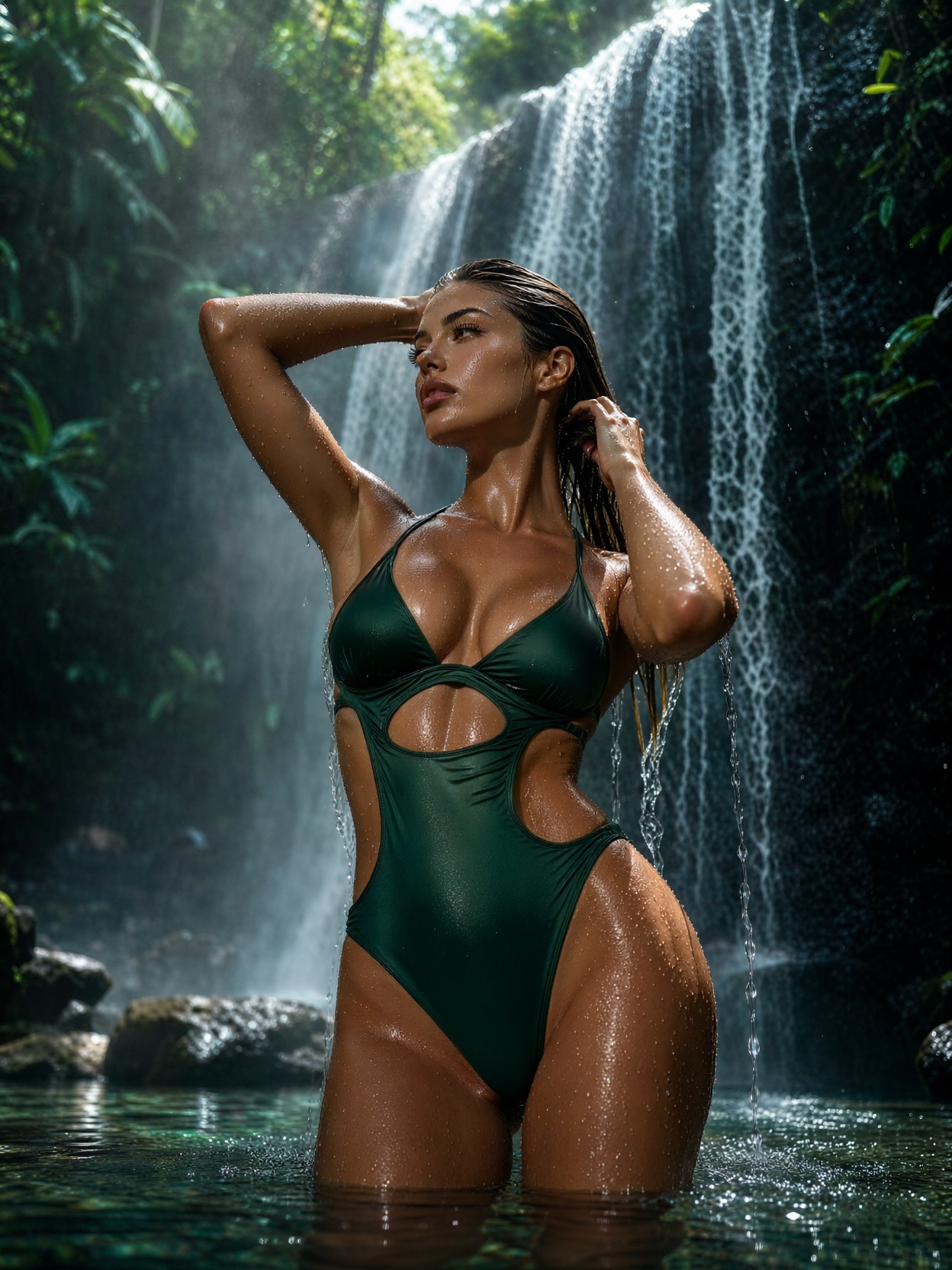
Woman Under Tropical Waterfall — AI generated image by Proxima.art
🔍 View full size

Woman Under Tropical Waterfall

Styles used:
GPT style GPT style
Grim Dark Glamour 80s Grim Dark Glamour 80s
Realism, Outdoor Lifestyle Photography. Low-angle waist-up shot of a stunning, athletic young woman standing beneath a gentle, misting tropical waterfall in Bali. She is looking off to the side, adjusting her long hair with both hands as fresh water streams down her shoulders. She wears an elegant dark-emerald green slinky monokini with subtle waist cutouts. Micro-droplets of water coat her glowing skin and eyelashes. Soft, diffused daylight cuts through the lush green jungle canopy, illuminating the rising mist and creating crystal-clear reflections in the clear water pool around her. Shot on Sony A1, 35mm f/1.4 lens, rich dynamic contrast, extreme sharpness on wet skin textures and splashing water, photorealistic, 8k resolution.
✨ Generate with this prompt 🎨 Try Proxima Studio
100 free credits every day Sign up free and generate right away — no card needed. Your free credits refill every day, so you can keep trying new models.

Bring this image to life

Like this image? Turn it into a video or a whole story with Proxima Studio — consistent characters, storyboard, 2K film.

Share your result in our Reddit community r/ProximaArt — selected high-quality creations may occasionally receive bonus credits.

How this image was made

Full prompt:

Realism, Outdoor Lifestyle Photography. Low-angle waist-up shot of a stunning, athletic young woman standing beneath a gentle, misting tropical waterfall in Bali. She is looking off to the side, adjusting her long hair with both hands as fresh water streams down her shoulders. She wears an elegant dark-emerald green slinky monokini with subtle waist cutouts. Micro-droplets of water coat her glowing skin and eyelashes. Soft, diffused daylight cuts through the lush green jungle canopy, illuminating the rising mist and creating crystal-clear reflections in the clear water pool around her. Shot on Sony A1, 35mm f/1.4 lens, rich dynamic contrast, extreme sharpness on wet skin textures and splashing water, photorealistic, 8k resolution.

Model:

Qwen 2.1

Styles & LoRAs:

GPT style
GPT style
A luminous celestial-fantasy style with opulent gilded detail, iridescent color, cinematic glow, and dreamlike mythic scale.
Strength: 60%
Grim Dark Glamour 80s
Focus on pastel tones and a touch of dark glamour. Shimmering silvers, sparkling effects, high-fashion moments from the past
Strength: 60%

Water on Skin: Why This Bali Waterfall Portrait Demands a Realism Model

Micro-droplets on eyelashes. That is the detail that makes or breaks this image. A single strand of water streaming off a shoulder is easy — but thousands of tiny beads catching diffused jungle light across skin and lashes is where Qwen 2.1 earns its keep. Its lifelike portrait lighting and native 2K output resolve wet-skin specular highlights the way a Sony A1 sensor actually sees them: sharp, not glossy-plastic.

The composition is quietly clever too. The low-angle waist-up framing puts the viewer at water level, so the rising mist becomes a natural backdrop blur while the emerald monokini anchors the frame against all that green-on-green jungle. Soft canopy light keeps the contrast rich without blowing out the waterfall highlights.

Swimwear Campaigns, Travel Editorials, and Wellness Branding

Any brand selling swimwear, skincare, or tropical travel wants exactly this shot — and shooting it for real costs a location scout, a model, and a rain-soaked camera crew. Use this prompt for fashion lookbooks, resort marketing, spa and wellness visuals, or editorial mockups.

Stick to 3:4 portrait or 2:3 — the vertical format suits the waist-up crop and gives the waterfall vertical energy. Wider ratios tend to dilute the mist atmosphere into empty jungle.

Dialing In Qwen 2.1 for Wet-Skin Realism

Qwen 2.1 natively renders 2K, so start high rather than upscaling later — wet textures degrade noticeably when enlarged.

  • Guidance: 3.5 — low enough to keep the water natural; pushing higher makes droplets look painted-on
  • Steps: 30 for final quality; 12 for composition previews
  • Resolution: 1080×1440 (3:4) or 1440×2160 to use the native 2K headroom
  • Keep the camera language: "Sony A1, 35mm f/1.4" is doing real work — it drives the shallow depth of field and the crisp-mist-soft-background split
If the skin reads too airbrushed, add "visible skin pores, natural texture" — Qwen 2.1 responds strongly to texture anchors.

A Note on the LoRAs

Both suggested LoRAs pull away from pure realism, so treat them as optional colour grading rather than style drivers:

  • GPT style at 0.30–0.40 — adds a cinematic glow and iridescent shimmer to the mist; at its default 0.60 it will push the image toward fantasy and break the photographic illusion
  • Grim Dark Glamour 80s at 0.25–0.35 — nudges the palette toward silvery pastels and adds a fashion-editorial shimmer; above 0.50 the tropical daylight turns studio-lit

For a true lifestyle-photography result, run both under 0.35 — or drop them entirely and let Qwen 2.1's native realism carry the frame.

Five Ways to Reshoot This Waterfall Scene

5 Targeted Variations on the Bali Waterfall Portrait
  • Golden hour swap: Change "soft, diffused daylight" to "warm golden hour sunbeams breaking through the canopy" — the mist turns amber and the emerald suit pops against orange
  • Overcast editorial mood: Replace the daylight line with "moody overcast light, deep jungle shadows" — the same pose becomes a high-fashion campaign with cooler skin tones
  • Underwater angle: Change the framing to "half-submerged shot from the water surface, camera at waterline" — reflections double, and the pool becomes a mirror
  • Wardrobe shift: Swap the emerald monokini for "flowing white linen dress, fabric clinging and translucent from the water" — instantly more romantic and editorial
  • Location transplant: Replace "tropical waterfall in Bali" with "glacial waterfall in Iceland, black basalt rock" — same pose, dramatically colder palette and mood

Two Prompts Ready to Generate

Both examples below apply variations from the list above, tuned for Qwen 2.1 at the recommended settings.

Variation: golden hour swap — amber canopy light replaces diffused daylight, warming the mist and making the emerald suit glow

Realism, outdoor lifestyle photography. Low-angle waist-up shot of an athletic young woman beneath a misting tropical waterfall in Bali, looking off to the side, adjusting her long wet hair. Warm golden hour sunbeams break through the jungle canopy, turning rising mist amber. Dark-emerald slinky monokini, micro-droplets on glowing skin and eyelashes, clear pool reflections. Sony A1, 35mm f/1.4, rich contrast, extreme sharpness on wet skin, photorealistic, 8k.

Variation: wardrobe shift — the monokini becomes a translucent white linen dress for a softer, more romantic editorial read

Realism, outdoor lifestyle photography. Low-angle waist-up shot of a stunning young woman standing beneath a gentle misting waterfall in Bali, adjusting her long hair, looking to the side. She wears a flowing white linen dress, fabric clinging and translucent from the water. Micro-droplets on her skin and lashes, soft diffused canopy light through lush jungle, rising mist, clear pool reflections. Sony A1, 35mm f/1.4, photorealistic, 8k, extreme detail.

More Photoreal Portraits to Explore

These prompts cover different corners of the realistic-portrait spectrum — noir drama, blue-hour whimsy, and cinematic warmth:

Explore AI Generation Tools on Proxima.art

Proxima Aurelia 2 Prompts Qwen 2.1 Prompts Krea 2 Prompts MOSS Image Prompts Qwen Image 2512 Prompts Proxima Nova Prompts Proxima Aurelia Prompts Proxima Veritas Prompts Ideogram 4 Prompts Qwen Image Prompts Z-Image Turbo Prompts Z-Image Base Prompts Ernie-Image Turbo Prompts Ernie-Image Base Prompts Proxima Midjourney Prompts Grok Imagine Prompts Grok Imagine Quality Prompts Flux Maestro Prompts HiDream-I1 Prompts Shuttle 3.1 Aesthetic Prompts Wan 2.2 Image Prompts 3D Character Abstract Art Abstract Expressionism Ad Creative Advertising AI Influencer Analog Horror Anime Architectural Visualization Art Nouveau Art Style Avatar Beauty Portrait Bioluminescent Boudoir Photography Branding Visual Candid Portrait Cartoon Avatar Character Close-Up Character Design Cinematic Cinematic Dark Fantasy Cinematic Fantasy Cinematic Lighting Cinematic Photography Comic Book Concept Art Corporate Studio Photography Cosmic Horror Cosmic Horror (Lovecraft Style) Cyberpunk Dark Fantasy Digital Illustration Documentary Style Dreamy Aesthetic E-commerce Image Editorial Style Emotional Portrait Epic Fantasy Fantasy Game Character Fashion Photography Film Noir Fine Art Photography Fractal Art Futuristic Futuristic Character Gallery Aesthetic Game Asset Game UI Glamour Glamour Photography Gothic Graphic Novel Aesthetic High-Fashion Editorial Horror Illustration Instagram Aesthetic Isometric Art Japanese Style Kawaii Landscape Photography Lifestyle Photography Liminal Space Horror Low Poly Luxury Packaging Macro Photography Magic & Fantasy World Magical Realism Marilyn Monroe Marketing Banner Miniature / Diorama Minimalist Art Mixed Media Nightmare Noir Style Photography Photorealistic Pixar Style Pop Art Portrait Product Photography Professional Headshot Professional Photography Profile Picture Realistic Photo Retro Futuristic Sci-Fi Sci-Fi City Selfie Transformation Sensual Portrait Spiritual Atmosphere Sports Photography Steampunk Still Life Photography Storytelling Scene Street Photography Studio Ghibli Style Studio Photography Surreal Art Tattoo Art TikTok Style Underwater Photography Unreal Engine Style Vintage Vintage Film AI Video Generator AI Image to Video AI Upscale Image AI Pose Transfer Text to Image AI

Proxima.art is a free AI image generator powered by Flux, Qwen, HiDream, and other state-of-the-art models. Browse prompts, copy them to the generator, and create stunning AI art instantly.